 TRAC 0.8 Documentation
Key concepts
This section explains some important concepts for TRAC users. If you read the IKEA instructions in full before touching a screwdriver, this is for you. If you like to work things out as you go, maybe skip to the next section.
Metadata model
Unlike traditional model platforms, TRAC is built around a structural metadata model which catalogues and describes everything on the platform.
Layers
The model consists of two layers:
OBJECTS |
Objects are the model’s structural elements and each object type (e.g. models or data) has its own metadata structure |
TAGS |
Tags are used to index, describe and control objects. Some tags are controlled by the platform, some you set yourself |
The metadata model provides a comprehensive audit history for the platform and all its contents. Read actions are not recorded.
Objects
There are four primary object types that users engage with.
Note
ImportData and ExportData jobs are used to move data in and out of TRAC via a back-end process and are not available in COMMUNITY TRAC, which only supports data import and export via the UI.
Virtual deployment method
Deployment steps
TRAC’s uses a ‘virtual deployment’ method for complex model deployments. This involves three steps.
IMPORT MODEL |
TRAC scans but does not copy the model code. A new metadata object is created which contains the model schema and a link to the code, which stays in the repository |
BUILD FLOW |
Models are combined to form a calculation blueprint in which the outputs of one model become the inputs to the next. Flow exist only as TRAC metadata. They are built and validated using model schemas, not the model code |
RUN JOB |
When a calculation job is initiated, TRAC fetches all the model code from the repository. Once the job is complete, the code it not retained. It’s fetched from the repository again, the next time it’s needed |
Note
This short video (under 3 mins) explains how the virtual deployment method works in detail.
Model schema
TRAC models contain or are ‘wrapped’ by a custom function which declares the model schema.
INPUTS |
The schema(s) of all the input data objects which the model needs to run |
PARAMETERS |
The schema of any parameters that govern how the model runs |
OUTPUTS |
The schema(s) of all the data objects which are produced when the model runs |
Note
See Modelling for more details on model schemas and building TRAC models and see TRAC data types for details of the data types that are available when defining and using schemas.
Schema validation
This is an example of a TRAC schema.
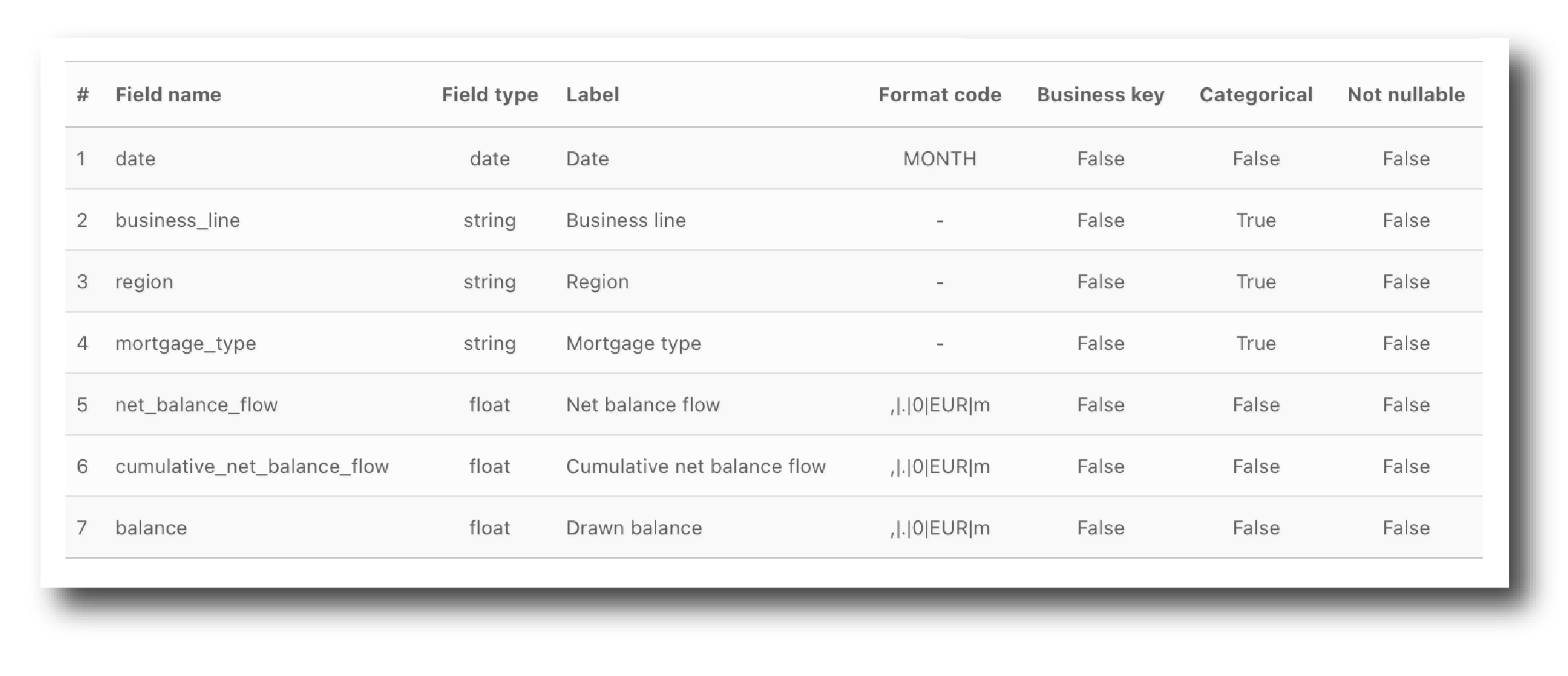
Schema validation occurs when selecting data inputs for a RunModel or RunFlow job and when combining models to build a flow. In both instances, TRAC applies strict schema validation.
Key things to remember are:
Validation occurs between object schemas not their data content
Validation considers Field name, Field Type, Business key, Categorical and Not nullable
The order in which the field names appear is not important
The source schema must contain all fields needed by the target object. It can contain extra fields.
The TRAC guarantee
TRAC creates a unique control environment which is embodied by a three-part guarantee:
Every action is auditable
Every calculation is repeatable
There is no change risk on the platform
This guarantee is made possible by the interactions between the virtual deployment method, the metadata model and the fact that TRAC makes both models and data immutable.
Note
This short video (under 2 mins) explains the platform’s approach to versioning and immutability, and how the TRAC Guarantee works in detail.
Resources
To execute jobs TRAC uses four different types of external system resources. These resources are defined and managed at the individual tenant level, by Admins.
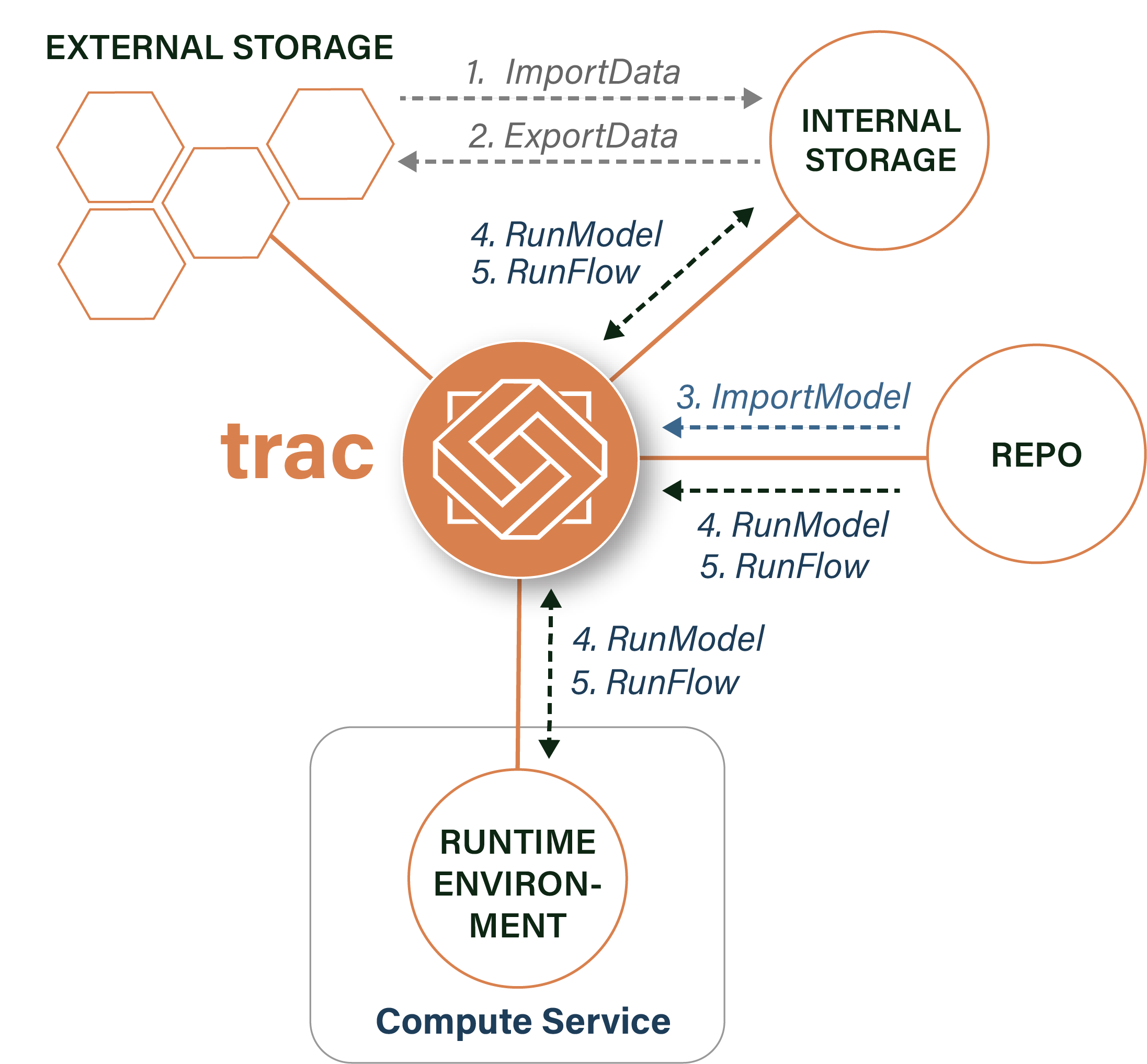
INTERNAL STORAGE |
The data location(s) to which only TRAC has write access, that are used to store primary data |
EXTERNAL STORAGE |
The data location(s) which TRAC can copy data to/from when running DataImport and DataExport jobs |
REPOSITORIES |
The external code repositories from which models can be imported using ImportModel jobs |
RUNTIME ENVIRONMENTS |
The combination of libraries which are made available to model code at runtime |
The following diagram shows the interactions between resources and job types
Note
In TRAC COMMUNITY, Internal Storage will be a local file directory, there are no mechanism to add External Storage locations and only a single Runtime Environment is available.
User access
Tenants
Tenants are logically separate domains within TRAC that play a key role in user access management.
Every object resides in, and can be accessed only from, one tenant. If you upload the same model or dataset to two tenants, each upload creates a unique metadata object, both referencing the same external asset.
How to set up your tenants is a question of judgement. Generally, use-cases which share a common business vocabulary should share a tenant. Those which do not, should not.
Note
TRAC COMMUNITY has one tenant. In TRAC PROFESSIONAL tenants are created by Admin users.
Roles
To complete any action in a tenant a user must be assigned a tenant-role, either Admin, Manager, Write or Read.
ADMIN |
System admins can create new tenants. Tenant admins manage resources in those tenants |
MANAGER |
User can upload models and change object tags in their tenant |
WRITE |
User can import and upload data, build flows and run jobs in their tenant |
READ |
User can read data and metadata in their tenant |
These roles are inclusive, so Write implies Read and Admin implies Manager, Read and Write.
Note
For enterprise deployments of TRAC PROFESSIONAL, these roles would typically be defined upstream with with users accessing TRAC via the enterprise SSO mechanism.